
Delivery statistics
Statey tracks delivery for every statement email, per recipient — so you know who received their statement, who didn't, and why.
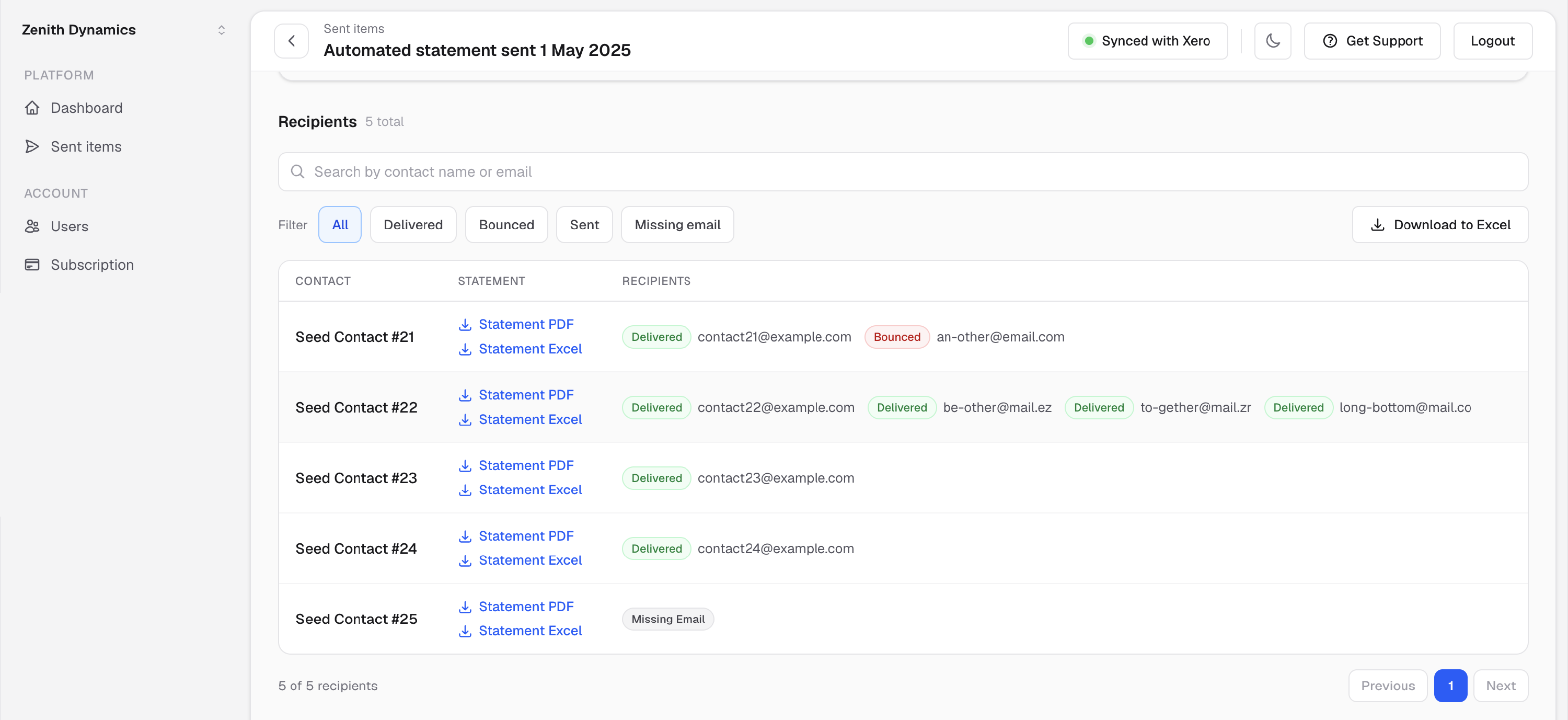
Per-recipient delivery status
Every email address on every campaign gets its own status:
- Delivered — accepted by the recipient's mail server
- Bounced — rejected, with the actual bounce reason shown in a popover (bad address, full mailbox, blocked, and so on)
- Processed — handed to the mail network, final status pending
- Missing email — the contact has no email address in Xero, flagged before and after the run
Act on it
- Filter and search campaigns by delivery status to find problems fast.
- Failed statuses come with a prompt to fix the address and resend.
- Download any campaign's recipients and outcomes to Excel.
- Contacts with missing emails are badged across the dashboard and in schedule previews, so gaps get fixed before the next run.
FAQ
How do I know if a customer actually received their statement?
Open the campaign in Sent Items — each recipient shows delivered, bounced (with the reason) or processed.
What happens if an email bounces?
The bounce and its reason are recorded against that recipient, and Statey prompts you to correct the address and resend.
← Previous feature: Statement sending history
Next feature: Exclude customers from automated statement runs →