
Getting started with the Statey API
The Statey API lets your own systems read your Xero-backed customer data, generate statements and send them — without anyone signing in.
This guide takes you from nothing to your first successful request.
Before you start
You need:
- A Statey organisation on the Pro plan. The API is not available on lower plans.
- Permission to administer that organisation — you are its owner, or a Xero user with Standard or Financial Adviser access.
1. Create an API key
-
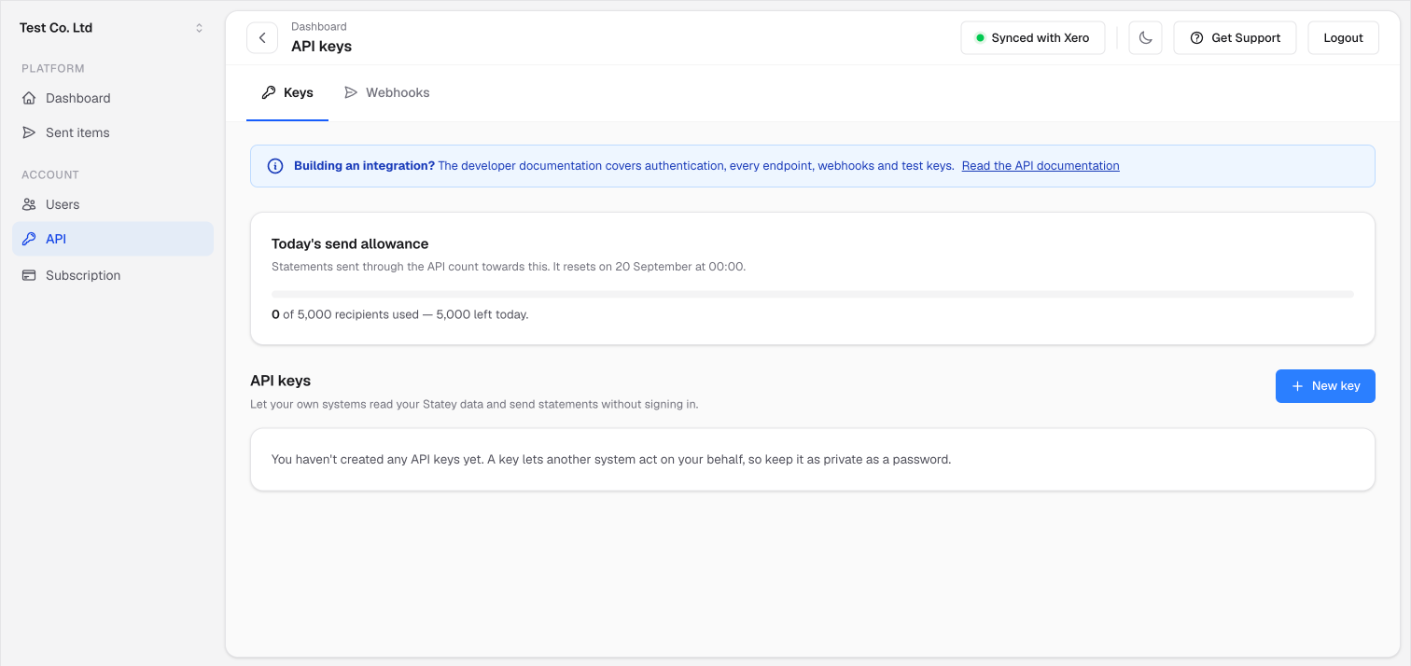
Sign in to Statey and go to Account → API.
-
Choose New key.
-
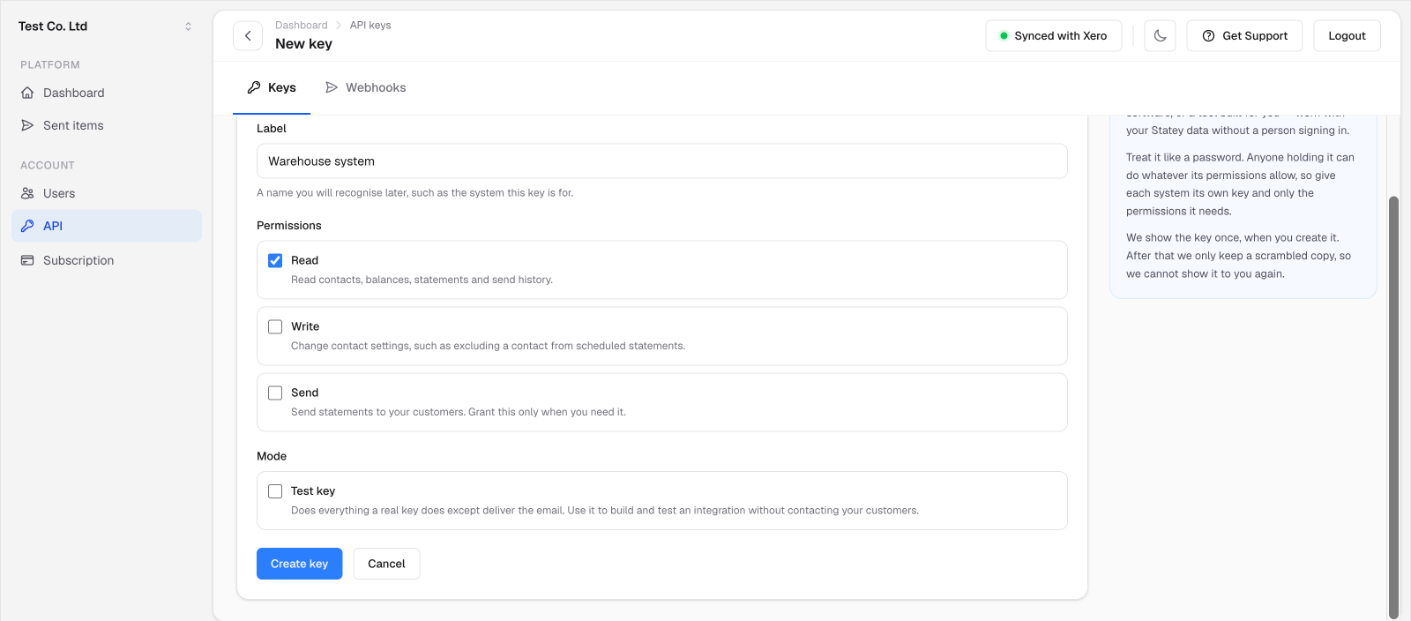
Give it a label you will recognise later — the name of the system that will use it, not "key 1".
-
Choose its permissions:
Permission What it allows readRead contacts, balances, statements and send history writeChange contact settings, such as excluding a contact from scheduled statements sendSend statements to your customers Grant only what the system needs. A reporting tool needs
readand nothing else. -
Decide whether you want a test key. A test key does everything a real one does except deliver the email, so you can build an integration without contacting your customers. See Test keys.
-
Choose Create key.
Copy the key now. It is shown once. We store only a scrambled copy, so we cannot show it to you again — if you lose it, create a new key and revoke the old one.
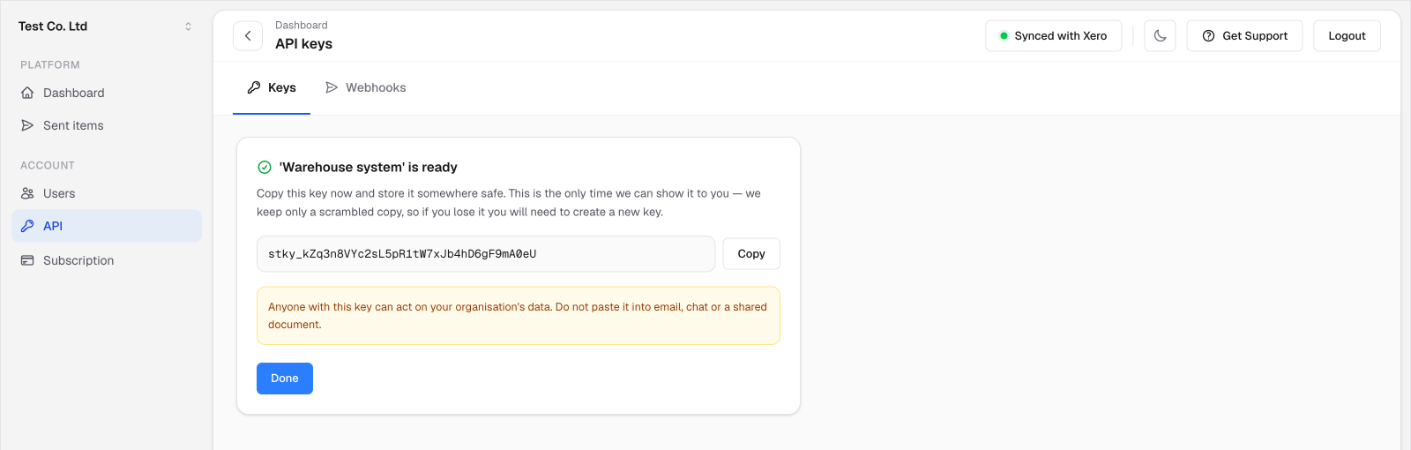
Keys look like this, with test keys carrying their own prefix:
stky_kZq3n8VYc2sL5pR1tW7xJb4hD6gF9mA0eU        ← live
stky_test_kZq3n8VYc2sL5pR1tW7xJb4hD6gF9mA0eU   ← test
Treat it like a password. Anyone holding it can do whatever its permissions allow, to your real customer data. Give each system its own key, so you can revoke one without disrupting the others.
Call this API from your server, never from a browser
The Statey API is server-to-server. Your backend holds the key and calls us; your users' browsers never do.
Putting a key into JavaScript — a single-page app, a website widget, a mobile app bundle — exposes it to anyone who opens developer tools or unpacks the bundle. They then hold a credential that can read your whole debtor book and email your customers.
A browser will not let this work in any case: we send no CORS headers at all, so a browser discards our response no matter which origin the page came from. Do not rely on that as your protection, though — the key is still exposed to anyone reading your JavaScript, and a non-browser client ignores CORS entirely.
If you need this data in a browser, fetch it on your server and pass through only what that page actually needs.
2. Make your first request
Send the key as a bearer token:
curl https://www.statey.app/api/v1/organisation \
  -H "Authorization: Bearer stky_your_key_here"
A successful response confirms which organisation the key belongs to and what it may do:
{
  "organisation": {
    "id": "f1e2d3c4-b5a6-4978-8a9b-0c1d2e3f4a5b",
    "name": "Northwind Trading",
    "base_currency": "NZD",
    "timezone": "Pacific/Auckland"
  },
  "api_key": {
    "label": "Warehouse system",
    "scopes": ["read"],
    "sandbox": false
  },
  "meta": {
    "data_freshness": {
      "last_completed_at": "2026-09-17T04:12:33Z",
      "rebuild_in_progress": false
    }
  }
}
This endpoint is the one to call when you want to check a key works. It needs no permissions beyond read and touches nothing.
timezone is worth noting: daily allowances and schedules roll over at your organisation's midnight, not UTC.
3. Fetch some contacts
curl "https://www.statey.app/api/v1/contacts?filter=overdue" \
  -H "Authorization: Bearer stky_your_key_here"
{
  "contacts": [
    {
      "id": "9f8e7d6c-5b4a-4392-8172-6a5b4c3d2e1f",
      "name": "Acme Supplies",
      "currency": "NZD",
      "account_number": "ACM-014",
      "balance_due": "4820.00",
      "amount_overdue": "1200.00",
      "available_credit": "0.00",
      "most_days_overdue": 47,
      "oldest_due_date": "2026-08-01",
      "last_invoice_date": "2026-09-09",
      "missing_email": false,
      "total_issues": 0
    }
  ],
  "meta": {
    "page": 1,
    "page_size": 50,
    "total_pages": 12,
    "total_count": 573,
    "data_freshness": {
      "last_completed_at": "2026-09-17T04:12:33Z",
      "rebuild_in_progress": false
    }
  }
}
Two things to know about this response:
- Money comes back as a string, not a JSON number. A float cannot hold a decimal balance exactly, and silently losing cents on a debtor balance is not acceptable. Parse it with a decimal type.
- A contact appears once per currency. If Acme trades with you in NZD and AUD, you get two entries with the same
idand differentcurrency. Key your own records on the pair, not onidalone. Add?currency=NZDto narrow it.
The list does not include email addresses — fetching those needs a join, so they live on the individual contact endpoint: GET /api/v1/contacts/{id} .
Available filters: overdue , outstanding , has_credit , missing_email , has_issues . An unrecognised filter is rejected rather than ignored — returning the unfiltered list would hand you the wrong data with no way to notice.
4. Page through results
Collections are paged with page and page_size . meta.total_pages tells you how many there are:
curl "https://www.statey.app/api/v1/contacts?page=2&page_size=100" \
  -H "Authorization: Bearer stky_your_key_here"
page_size defaults to 50 and is capped at 200.
You can also search by name or account number, and sort by name or by any of the balance columns.
One thing to know before you page through everything: Statey recalculates balances in the background, roughly hourly, and a recalculation can move rows between pages while you are reading them. Sorting by xero_name avoids it, because names do not change when balances do. Searching, sorting and paging explains this properly and is worth ten minutes before you write an export.
5. Check the data is fresh
Every read carries meta.data_freshness :
"data_freshness": {
  "last_completed_at": "2026-09-17T04:12:33Z",
  "rebuild_in_progress": true
}
Statey refreshes from Xero throughout the day. While a refresh is running, figures are still returned — they are simply the last completed ones. A person sees a banner telling them this; your script cannot, which is what this block is for.
rebuild_in_progress being true is not an error and not a reason to stop. If you need a consistent snapshot — an end-of-month report, say — wait for it to be false , or subscribe to the organisation.data_rebuilt webhook instead of polling.
Rotating and revoking keys
There is no rotation in place. To roll a key:
- Create a new key with the same permissions.
- Move your system across to it.
- Revoke the old one.
Revoking takes effect immediately — the next request using that key is rejected. Revoked keys stay listed so your audit trail still makes sense.
You can revoke a key on any plan, including after a downgrade. Turning off a leaked credential is never blocked by billing.
What to expect when something is wrong
Errors carry a stable machine-readable code :
{
  "error": {
    "code": "insufficient_scope",
    "message": "This API key does not have the required scope.",
    "request_id": "a1b2c3d4-e5f6-4789-0abc-def123456789"
  }
}
Branch on code , never on message . Messages get reworded; codes do not. Quote request_id when you contact support — it identifies the exact request in our logs.
See the error reference for the full list.
Next steps
- Test keys — build and test without emailing your customers
- Searching, sorting and paging — read before exporting your whole customer list
- Who receives a statement — the two address lists, and how to change which is used
- Idempotency — how to retry a send safely
- Rate limits and quotas — the ceilings and how to back off
- Webhooks — get told when something happens instead of polling
- Async sends — the request-then-poll pattern for statement documents