
Age Analysis — Statement Section
Add an Age Analysis (ageing buckets) section to your Xero customer statements using Statey — with buckets you choose, not just 30/60/90.
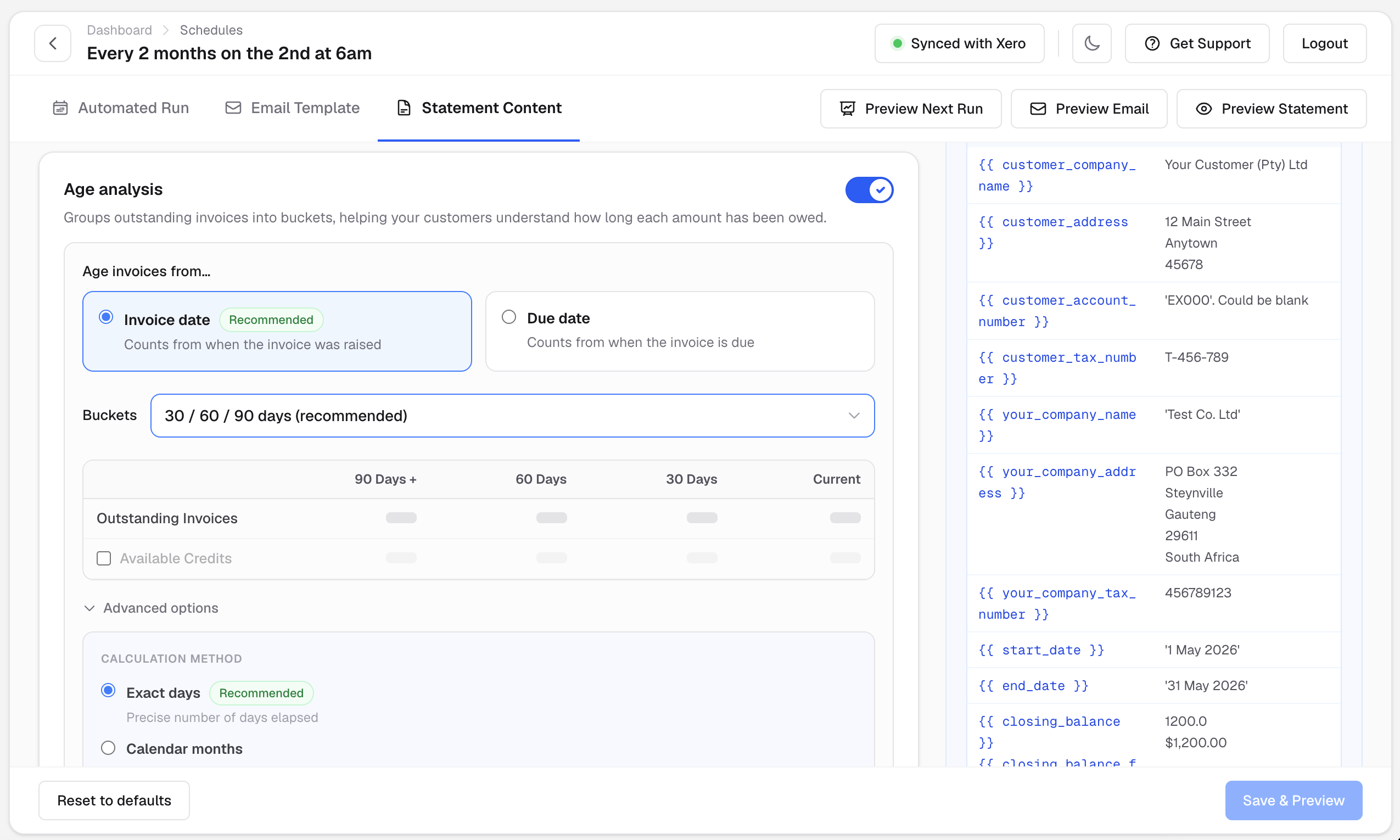
The Age Analysis section breaks down the customer's outstanding balance and available credits into ageing columns (buckets).

Choose your ageing buckets
Statey's buckets are configurable. Pick from eight presets:
- 30 / 60 / 90 days (the classic, and our recommended default)
- 30 / 60 / 90 / 120 days
- 30 / 60 / 90 / 120 / 150 days
- 7 / 14 / 28 days (weekly ageing)
- 7 / 14 / 28 / 42 days
- 28 / 56 / 84 days
- 15 / 30 / 45 days
- 15 / 30 / 45 / 60 days
The statement's columns adjust automatically to your chosen buckets — in both the PDF and Excel versions of the statement — and you'll see a live preview of the resulting column headings as you configure.
Choose how ages are calculated
Two independent settings control the ageing maths:
- Age from invoice date or due date. Age each invoice from the date it was raised (default) or from the date it fell due.
- Exact days or calendar months. Count ages in exact days, or by whole calendar months. (Calendar months can't be combined with the 7- or 15-day bucket presets — Statey warns you if you pick an incompatible pair.)
Other options
- Include or exclude the Age Analysis section entirely — every statement section in Statey is independently switchable.
- Show or hide the available credits row within the Age Analysis.
FAQ
Can Statey use ageing buckets other than 30/60/90 days?
Yes. Choose from eight bucket presets, including weekly (7/14/28-day), 15/30/45-day and extended 120/150-day ranges. The statement columns adapt automatically.
Can the age analysis be based on due date instead of invoice date?
Yes — that's a per-statement setting, and you can also choose exact-day or calendar-month counting.
Does the Excel statement include the age analysis too?
Yes. Whatever buckets you configure appear in both the PDF and the Excel statement.